
1. Remove any inserted memory cards and turn the photo frame on.
2. Use the Mode button to select Photo mode.
3. Next, use the Options button select the Options menu.
4. Use the up and down arrows to select Delete then press the Select button open the delete menu. You will now see a thumbnail view of each of the photos stored in the photo frames memory.
5. Use the arrow buttons to select a photo you would like to copy to the photo frame, then press the Select button. A tick should appear in the top right hand corner of the photo when selected.
6. Once you have selected all of the photos you would like to delete, press the Ok button.
7. Delete selected files? will be displayed on the screen. If you are sure you would like to proceed to delete the files you selected press the Delete button, if you want to cancel press the Back button.
8. Deleting will be displayed on the screen while the photos are being deleted, and once complete you will be returned to the menu.
9. Press the Back button to close.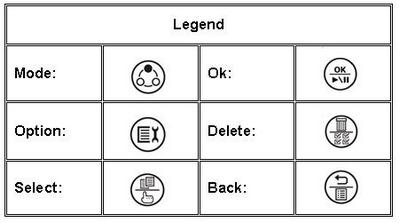
Featured

Toshiba dynadock® V USB Docking Station with Video
Minimise cable clutter. Maximise convenience.
Learn more
How To
How To
