

The Supervisor password is something that can only be set by someone using the computer. If you know what the password is and want to remove it, this can be done by the following.
Windows 7 and Windows Vista
1. Click on you Start menu
2. Select All Programs
3. Select Toshiba
4. Select Utilities
5. Click on Toshiba Assist
6. Select Secure then click on Supervisor password 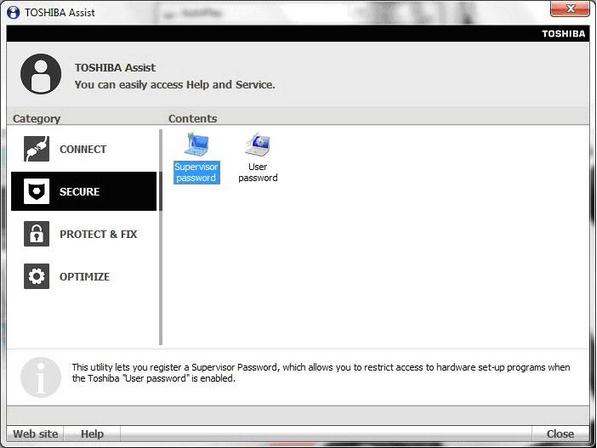
7. Select Not Registered, then enter your Supervisor password and click OK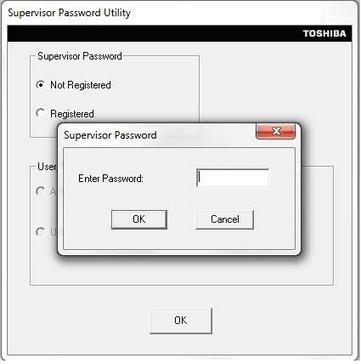
8. Click OK. Then click Yes to power off your computer.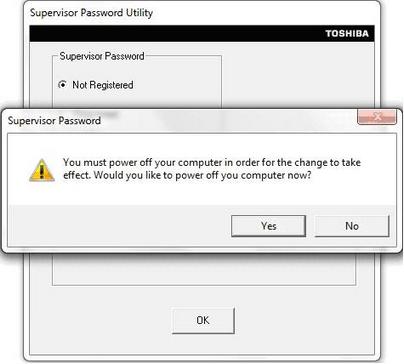
When you turn your computer back on, the Supervisor password will have been removed.
Windows XP
1. Click on you Start menu
2. Select All Programs
3. Select Toshiba
4. Select Utilities
5. Click on Toshiba Assist
6. Select Supervisor Password tab.
7. Click Delete and click Delete again on the box that appears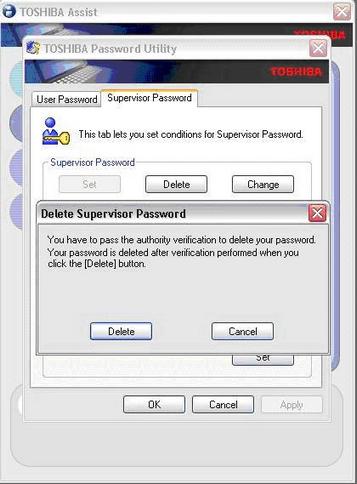
8. Enter your Supervisor password and click Verify.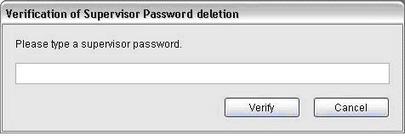
9. The Supervisor password will now have been removed.
Please note: Toshiba does not have any master passwords to override your existing password. If you do not know the Supervisor password and want to remove it, this can be done at a Toshiba service provider for a fee.
Bookings may be placed online at www.toshibamobilecare.com.au (Australia) www.toshibamobilecare.co.nz (New Zealand). Proof of ownership may be required.
Featured

FAQ
FAQ
